Why One Photo Is Actually All the AI Needs to Build a Listing From Scratch
A single photo can seed a full listing, but sold-price data sets the price.

A snap-a-photo AI listing app can turn one picture into a title, description, category, and suggested price before a casual seller types a word. The photo shows the product details, and market data backs up the price. One photo can start the whole listing, though the seller still needs to check anything the camera cannot see.
What a photo actually contains that makes AI-generated listings possible
Most sellers treat a product photo as documentation, something to attach after writing the description. In fact, it is compressed product data. A logo can identify a brand, a silhouette can suggest a model, and visible wear can help establish condition. The seller may see an old jacket taking up space in the wardrobe. The image also contains the raw material for its title, category, and condition note.
Those clues are often quite specific. Logos, typefaces, and hardware help distinguish brands, while shape and form factor separate a camera body from a stroller or a cast-iron skillet. Scuffs, pilling, yellowing, dents, and wear at stress points give evidence about use. A well-lit photo can show those details without the seller having to name each one. The information is already there, even if nobody has put it into words.
Tags still attached suggest near-new condition, while original packaging can signal completeness. A power cord in the frame gives the listing a visible accessory to mention. Size cues and wear patterns can also help explain what the buyer is looking at. These clues support tentative inferences grounded in what the photo shows.
Why early multimodal AI failed at this task and what changed
Having information in a photo is not the same as being able to turn it into accurate listing language. Earlier systems struggled with that connection. Meta’s earlier approach used DeepText, a text-understanding engine built with convolutional and recurrent architectures, and Lumos, a 50-layer ResNet image encoder. They processed text and images separately, then merged their outputs through a multilayer perceptron. The information had to cross a handoff before it could become a description.
That handoff was a weak point. A worn corner on a jacket might register as a visual detail without connecting cleanly to the language needed for a condition note. Identifying “jacket” was the easier task. Explaining where it showed wear required the image system and the text system to agree on something more precise. The translation step between them could lose information.
Llama 4, Meta’s April 2025 multimodal model, changed how this works by processing text and image tokens together from the first layer. Meta calls this “early fusion.” Rather than describing an image and then passing that description to a separate writing process, the model reasons across the image and language in one pass. A visible worn area can therefore become listing language such as “shows light wear at the collar.” This makes condition grading more credible, though it does not make unseen damage visible.
Launched July 24, 2026, it was a free standalone iOS tool for U.S. users 18 and older, with Android and web versions in testing. A seller uploads a photo, and the app identifies the object, condition, attributes, and likely category. It gives the seller a draft with a title, description, suggested price, and category before they type anything. Its dedicated space also includes bulk listing, a unified buyer inbox, listing management, and performance insights, separate from the social feed.
Pricing comes from a different source than the picture. The app surfaces comparable active listings in the seller’s area in real time, so a used KitchenAid mixer in Austin, Texas gets a suggestion informed by similar mixers listed in Austin today. Past eBay sales alone cannot show what is listed nearby right now. The platform behind it is substantial, with more than 3.5 million Marketplace listings posted daily in the U.S. and Canada.
Is there an app that creates listings from a picture for other marketplaces?
Independent tools address a different need from Meta’s dedicated app. A seller may want a draft for eBay, Poshmark, Kijiji, or several destinations including Facebook Marketplace. These tools differ in how they read photos, format the result, and move it toward publication. Some prepare text to copy and post, while others handle publishing. “Creates a listing” does not always mean “puts it live,” so that distinction belongs in any comparison.
Flotsam suits sellers who want marketplace-specific formatting without creating an account. Available on iOS and Android, it takes up to eight photos of one item and generates a title, description, condition note, and adjustable price range. Its Pro subscription adds formatting for Facebook Marketplace, Kijiji, and Poshmark. Its Play Store listing describes pricing drawn from what comparable items are listed at on eBay, supporting an asking-price comparison while leaving a completed-sales basis unconfirmed.
The free and paid tiers also read different evidence. Flotsam’s free tier reads text on labels, boxes, and tags on-device, so it helps to have words the app can read in the photo. Pro sends photos to its server for full AI image analysis, which better fits unlabelled or worn items. When comparable pricing data is insufficient, the app says so. It also leaves condition blank when the evidence does not support a judgement, an omission more useful than confident fiction.
Listed AI is an iOS app for sellers who need descriptions for more than one item or platform. It takes 2–4 photos and writes descriptions ready to post on sites including Vinted, eBay, Depop, and Facebook Marketplace. It also generates hashtags, lets sellers toggle emojis, and removes or swaps backgrounds. Automatic price ranges are based on the item, although the supplied details do not establish a sold-data source. It is free with in-app purchases, with version 1.6.3 noted as of November 2026.
Sellaroo addresses the input side of the job through an AI photo coach that prompts sellers to capture labels, damage points, and accessories before generating the listing. Its Play Store listing says prices come from items that sold nearby and match the product and its condition. Text-reading limits, photo guidance, pricing evidence, and publishing support are more informative than the size of the “AI” badge.
Why pricing from real sold data — not active listings — is what makes an AI suggestion trustworthy
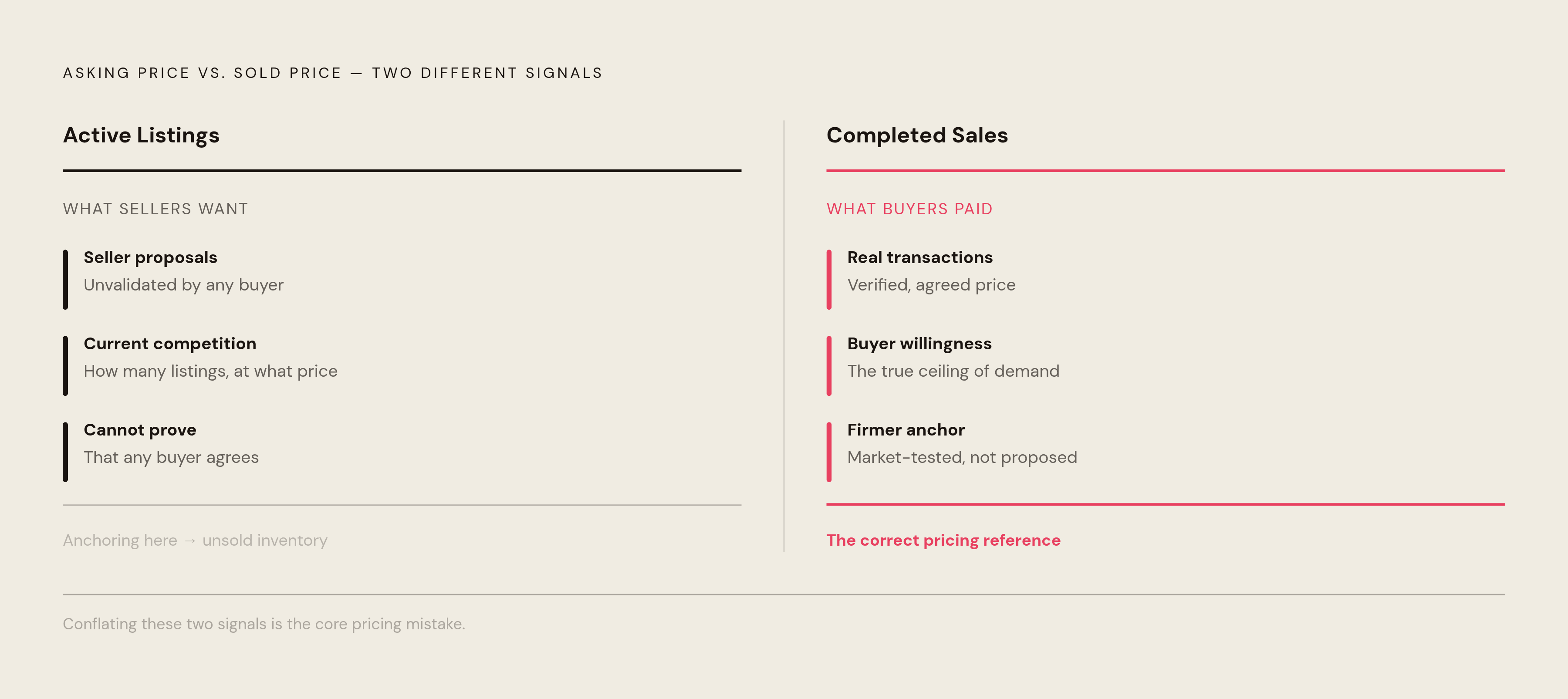
An accurate description and a defensible price require different evidence. The photo can establish what an item appears to be and how much visible wear it has. Establishing what someone will pay requires market data, and the distinction between asking prices and sold prices is fundamental. An asking price is a seller’s proposal.
Active listings show inventory that has not yet sold. They can reveal the competition a seller faces, but they do not prove that those prices attract buyers. An AI system that treats asking prices as what buyers paid may suggest a price that leaves the item sitting unsold. A beautifully written description just gives the unsold item better stationery.
Completed sales provide a firmer anchor because they record what a real buyer was willing to pay. One way to set a price is to start with the median completed sold price from recent sales, then adjust it for condition and platform fees. That differs from taking the midpoint of active asking prices. Condition grading then helps match the item in the photo to the right comparisons.
Facebook Marketplace does not publish a sold-price history the way eBay does, leaving a gap for tools that price local listings. eBay’s completed-sale data gives a starting price, and local active listings show what else is for sale now. Those signals answer different questions. Meta’s local data shows what else a buyer can choose today, while sold comparisons show what buyers have paid. A seller who understands the difference can use both without mistaking either for a guaranteed sale price.
What the photo still can't tell the AI, and what that means for the seller
A photo can support a credible starting listing without revealing everything a buyer should know. It cannot show fabric hand-feel, musty or smoke odor, or an internal electronics fault. Some stains disappear under particular lighting angles. Damage on the back of an item stays invisible when only the front is shown.
A visible brand mark may help identify what an item appears to be, but it does not reliably establish whether a convincing fake is genuine. Louis Vuitton, Rolex, and rare sneakers still benefit from human review or specialist authentication services. Recognizing a logo is not authenticating its owner.
The seller’s remaining task is therefore narrow but important. The seller should check the AI’s condition note against what they know, add anything the angle missed, and be honest about hidden issues. That review takes seconds rather than the minutes consumed by manual listing research.
Showing defects also helps the listing do its job. Buyers who can see a flaw before messaging have less reason to question the rest of the description and less to negotiate over later. Seller review preserves control over accuracy without handing the whole research and writing job back to the seller.
How to give the AI the best possible photo to work from
Start with a hero shot that keeps the full item in frame, uses natural or even window light, and places it against a plain background. That gives the AI a clear view of the object and its category. A studio is not required.
A label or model-number shot is the most useful supplemental photo. It can make the brand, model, size, and materials readable rather than leaving the system to infer them from appearance. This is particularly useful with Flotsam’s free on-device text reading. Photograph wear and damage directly, too, so the condition note has evidence to work from. One photo can trigger the listing, but it is not a rule against showing the other side.
Size and accessories deserve the same clarity. A hand or common object in the frame gives scale and helps prevent the familiar complaint that the item was smaller than expected. Any included power cord, original box, remote, or manual should appear in at least one photo. Manufacturer stock photos make it harder to show the used item for sale because they show a perfect product.
For sellers who want that process to end in publication on two marketplaces, Reclaim: Sell with AI reads a single photo, writes the full listing, prices it from real eBay sold data, and publishes to eBay and Facebook Marketplace in one tap without typing. It is an independent option for sellers who want one draft on both marketplaces, with sold comparisons rather than Meta’s live local asking-price signal as the pricing anchor.
The seller can leave the work of identifying the item, condition grading, and writing to the tool. A clear starting photo lets the tool do that work, while label and damage shots close the most obvious gaps. The sophistication comes after the shutter. The seller’s part stays simple, provided the label and flaws make it into the frame. Point, shoot, done.