How Bulk-Photo Session Apps Generate Every Listing Simultaneously Instead of One at a Time
AI batch tools turn one photo session into finished listings, but review still matters.

Bulk-photo session apps take photos of a room’s worth of items and make a listing for each one, so the seller does not have to write them all by hand. They group photos, identify items, generate copy, and suggest prices across a batch, so 20 photographed items can become 20 ready listings. It still includes seller review before publishing.
Why photo sessions used to end in a pile of open drafts instead of finished listings
The photo session ends with a full camera roll, an open app, and blank drafts waiting for attention. The couch looks good. The drill has its close-up. But neither has a title, a description, a price, or a destination, and taking the pictures has not done that work. The seller has finished the visible task and uncovered the clerical one.
Native platform tools handle parts of this gap. eBay offers bulk upload through Seller Hub, while Poshmark makes CSV bulk upload available to Posh Ambassadors and Brand Partners. eBay’s AI also suggests titles, categories, and item specifics from photos, so it would be wrong to call every native draft entirely blank. The seller still has to check those suggestions before the listings go live.
The seller has to do that work for every item they photograph. The first few descriptions feel productive, but by item eleven, the seller is explaining the virtues of a kitchen gadget they forgot they owned. That is the bottleneck bulk selling needs to remove. Moving photos into drafts helps with transport, but the seller still has to unpack the van.
Three generations of tooling and why only the third one actually closes the gap
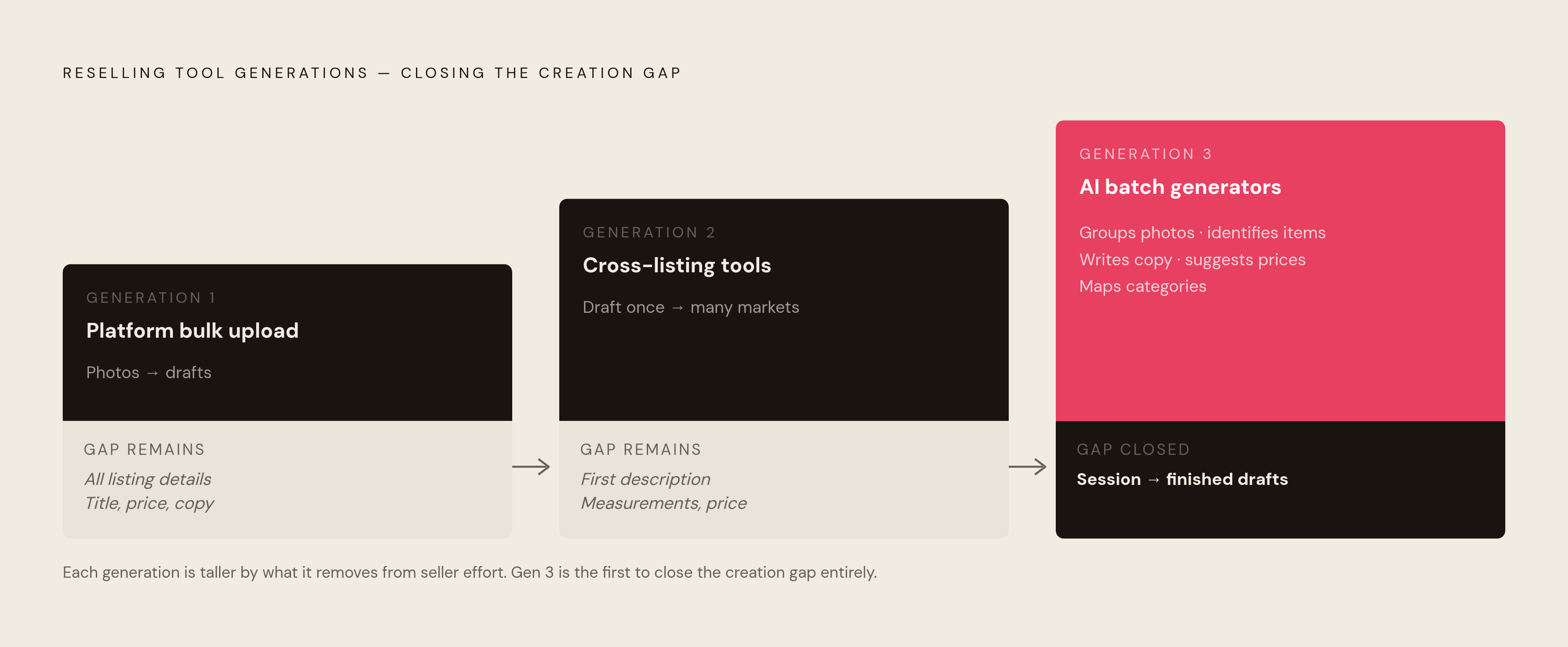
The first generation, platform bulk upload, primarily moved photos into drafts. Sellers still had to open those drafts and supply listing details. Later AI suggestions made some of that work easier, but did not always turn a whole session into finished listings.
The second generation, cross-listing tools, tackled a different repetition. A seller could draft a listing once and distribute it to several marketplaces. That helped businesses keep track of their stock week after week, but sellers still had to work on the first description, measurements, and price.
That distinction also changes the subscription calculation. A monthly cross-lister can earn its fee across hundreds of sales, but a one-time garage clearance gives that cost much less room to spread. The seller needs to finish a cleanout. A workflow built for recurring stock is not automatically a good fit for the spare bedroom.
The third generation, AI batch generators, takes on the work of creating the listings. The seller drops a session’s photos into one place, and the software sorts shots of the same item into separate listings without manual grouping. It then fills in the details earlier tools left to the seller.
How does an app turn a room’s worth of photos into listings at once?
Grouping comes first because every step after it needs to know which photos show the same item. The AI examines the batch, recognizes different angles of the same object, and assembles those shots into an item record. The seller does not have to pre-sort them. A room’s worth of item photos is therefore the input, rather than a promise that one wide shot of the room will reveal every saleable object.
Identification gives each record its subject. The AI reads visible brand marks, model details, and condition indicators to name what appears in the photos. Without them, fluent writing alone would be a nicely dressed guess.
Copy generation then turns the identified item and its visible condition into listing text. Marketplace-aware tools treat a Poshmark-friendly listing and an eBay-optimized listing as different outputs. Category mapping handles another layer of work by placing the item in each platform’s category hierarchy and supplying required fields. This is where purpose-built reselling software goes beyond a general AI writing tool.
Pricing joins those details inside the same workflow. Some batch tools also recognize related items shown together, such as a console with controllers and games, and create one bundle priced as a set. Grouping is not always about separating things. Sometimes the useful decision is to keep them together.
“At once” describes the seller’s workflow more securely than it describes the software’s internal timing. Automatic grouping and detail completion remove the need to trigger each listing separately, but those features alone do not prove that every computation runs in parallel or that a larger batch takes no longer.
How pricing gets generated alongside the listing instead of becoming a separate research task
Pricing can break the rhythm even after the description is finished. For each item the seller knows little about, they have to search again, compare prices, and decide what someone might actually pay. A batch generator keeps that interruption inside the listing process by returning a suggested price with the copy.
Past sales give sellers a price to compare against, and eBay’s Terapeak Product Research is free inside Seller Hub, with up to three years of sold data, sell-through rates, and trend graphs. Sold prices show what buyers paid, the foundation of a useful valuation, because an active asking price does not establish that buyers will pay it.
Local active listings answer a different question. The Meta Seller app, launched July 24, 2026, is free, available on iOS in the US, and surfaces comparable active listings in the seller’s area in real time. That adds context about nearby competition today to the context a local seller gets from past national sales. It is a useful signal, but not evidence of a completed sale.
The two approaches should not be treated as interchangeable. Historical data anchors a suggestion in actual transactions, while local listings show what similar sellers currently ask in the same area. The latter can help interpret a local market without overriding the need to price from sold evidence. A neighborhood full of optimistic asking prices is still a neighborhood full of asking prices.
Specialist tools can help where a category needs more context. PriceCharting covers games and trading cards, while WorthPoint provides historical prices drawn from auction houses and online marketplaces. Those tools help with categories that need more detail, but looking up every item on its own would bring back the same bottleneck. The batch model works when pricing arrives inside the draft.
What happens to the photos before the AI can process them, and why it matters for the listings that come out
Photo preparation sits upstream of all that automation. Poor lighting and cluttered backgrounds weaken the visual evidence used for identification, which in turn weakens the listing built from it. The AI needs clear views of the item and its visible details.
Platforms also have their own photo limits: eBay allows more photos per listing than most competitors, while Vinted and Etsy allow a similar number and Poshmark allows fewer. Poshmark moved its display format to portrait 3:4 in March 2026. A phone photo prepared for one destination may therefore need a different crop for another, even when the item itself is perfectly clear.
EXIF metadata deserves separate attention because phone photos can include GPS coordinates from where the item was photographed, often the seller’s home. Sellers should check how the tool they choose handles metadata stripping. Privacy preparation concerns both what the file contains and what the picture shows.
Editing photos of many items one at a time in a desktop editor takes longer than putting the whole set through an AI photo tool that can handle a batch. Preparing a batch together leaves the listings ready for their different destinations without rebuilding a per-photo chore.
Sending every listing to the right marketplace simultaneously once the batch is generated
Each listing needs to reach the marketplace where its buyers are. Facebook Marketplace is a good fit for bulky furniture and local goods, while eBay can help niche collectibles, vintage clothing, and electronics reach buyers across the country. Routing follows the item.
Fees make that choice more than a question of audience. Facebook Marketplace charges no seller fees on local pickup sales, while shipped orders processed through its checkout incur a percentage-based selling fee with a minimum amount. eBay charges seller fees on most sales. Those differences affect what remains from lower-ticket items when a large batch is cleared.
SnapToSell is built for eBay sellers and supports photo-to-listing creation on web or mobile, with a free Chrome extension that pre-fills Facebook Marketplace and Craigslist from inventory. That is not the same as identical publishing support across all three destinations. The distinction helps sellers judge how much work remains after generation.
For a casual seller facing a one-time cleanout, Reclaim: Sell with AI is a mobile option that identifies an item from a photo, writes its listing, and publishes to eBay and Facebook Marketplace in one tap, without a monthly cross-lister workflow to learn.
Distribution also needs a way to end gracefully. Cross-listing tools with auto-delisting remove an item from other marketplaces when it sells on one, preventing double-sales without constant seller monitoring. That feature should be distinguished from publishing support when comparing tools. Otherwise, the batch saves work at the start and hands it back as a sold-item cleanup shift.
What a completed bulk session actually looks like from first photo to last listing live
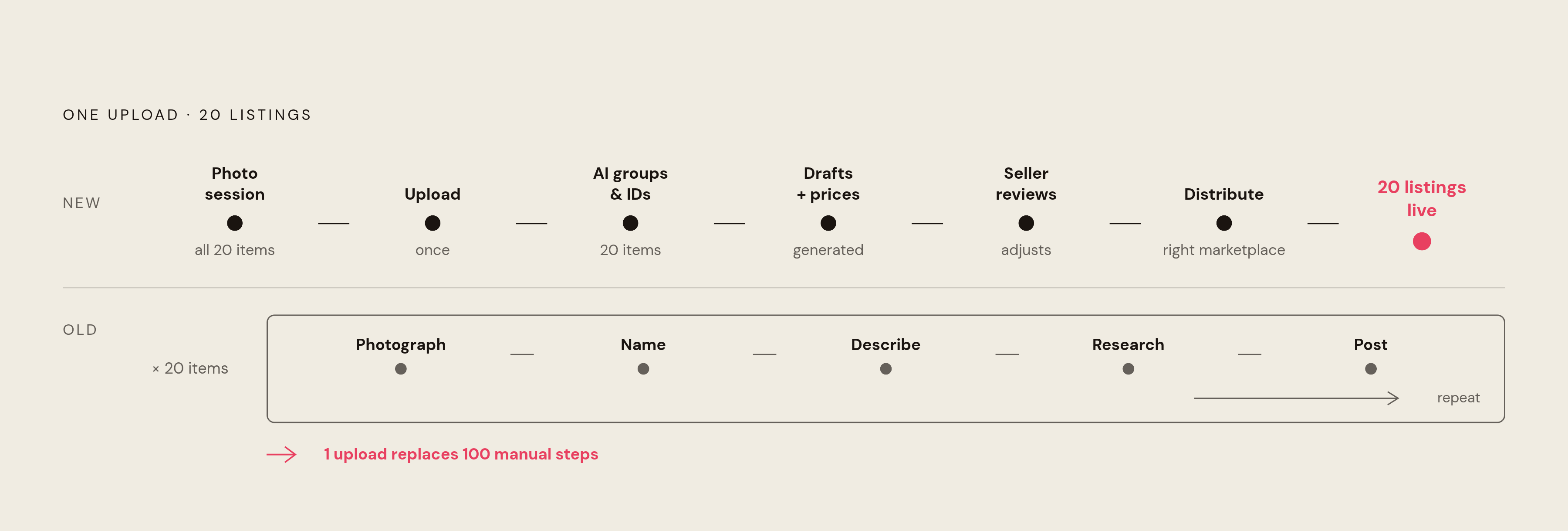
A two-bedroom clearance before a move includes a couch, a drill, an air fryer, lamps, a kitchen bin, and a printer among 20 items to sell. None requires an exotic sales strategy. Yet the old workflow gives each its own cycle of photographing, naming, describing, researching, and posting. The clock keeps accumulating those cycles as the seller moves through the room.
The batch workflow changes where that time goes. One photo session feeds one upload, after which the AI groups the images, identifies the items, and produces drafts with copy and suggested prices. The seller reviews and adjusts them. With distribution in place, the session can end with 20 live listings.
That outcome still depends on human review. Identification works best when brand marks or model numbers are visible, and condition grading from photos remains an estimate. Local comparable prices need spot-checking before publication. The seller’s job becomes reviewing evidence and correcting details, which is faster than blank-page creation but is not zero work.
Some batch tools offer a different endpoint, a single shareable storefront. For a local clearance, one URL in a neighborhood group lets buyers browse the whole batch. That changes the posting task as well as the listing task.
The volume threshold keeps the recommendation honest. A batch pipeline earns its keep at 10 or more items in a session, when repeated setup and data entry become a substantial part of the job. For one or two items, a manual listing in a native app is faster than setting up a batch workflow.