The Photo-to-Published Shortcut for Sellers Who Dread the Description Box
Photo-first AI apps turn editing into the easy part of listing.

The easiest way to list something without writing from scratch is to use a photo-first AI listing app, then check its draft before posting. Listed AI, EZList.AI and PoshGenie turn item photos into listing content, with different publishing and pricing features. The shortcut works because it replaces the blank description box with an editing task.
Why the description box stops casual sellers when photos don't
The photo is already taken. The item is ready to go. Then the listing form asks for a description, and selling an old jacket suddenly becomes a small copywriting assignment. What should the title say, which details belong in the description, and how much enthusiasm does a used zip deserve? Producing the words from nothing is the obstacle.
For casual sellers, the transition from image to words is the point where an intended listing stalls, leaving photographed items that never reach a buyer. Taking another picture does not solve that problem, because the picture was never the hard part.
Can an app turn a photo into a listing without typing?
Photo-first tools start with the information the seller already has. Instead of asking for a title, description and tags, they read the image and produce a draft of those fields. Computer vision picks out what is in the photo, while marketplace-aware language models put it in the form the selling platform needs. The seller checks the result and posts. The cursor no longer has to audition for a role.
Consider that jacket again. In the traditional workflow, the seller photographs it, opens a listing form and writes about its brand, colour, style and condition from scratch. In the photo-first version, the image supplies those visible clues, and the tool turns them into listing text. The seller can then check whether the brand is right and whether the description fairly represents the wear. Recognising an accurate description is easier than composing one.
The same change helps when there is more than one item to sell. Listed AI lets sellers group photos by item, make the listings in one go, then check and copy each one. Batch generation keeps the review step while removing the repeated cold start that makes a pile of unwanted clothes feel like homework.
What the AI actually reads from a photo — and what it still cannot do reliably
The strongest clues are the visible ones. Photo-reading AI can identify item categories, brand markings, garment styles, colours, visible wear and vintage patina. Clothing and vintage goods give it plenty to work with because much of their appeal and condition is expressed on the surface. A photo can show a faded finish or a distinctive style without the seller first finding the words for it.
AI cannot reliably recover exact dimensions, model numbers, the internal condition of electronics or compatibility details from a photo, and it can invent specifics it cannot see. The practical rule is to read the draft as a starting point, checking those claims before posting, especially for electronics with model-specific specifications. A camera cannot see inside a circuit board just by hoping for the best.
The tools that do this in 2026 and what distinguishes them
The useful comparison is not simply which app writes from a photo. These tools differ in what happens once the draft is ready: the seller may copy the text, have the form filled in for them or publish straight from the tool. Platform coverage also narrows the choice quickly. A tool for one marketplace meets a different need from one that makes listings for several. Pricing is another dividing line, because generating a description does not necessarily answer what to charge.
Listed AI suits sellers working through several items. It supports batch generation by grouping photos by item, producing listings together and letting the seller review and copy each result for Vinted, eBay, Depop and more.
EZList.AI focuses on making listings for eBay and publishing them straight to eBay. Its features include AI product identification, eBay market research, optimized listing content, background removal and photo enhancement, making it a fit for sellers whose destination is eBay.
PoshGenie is the Poshmark-focused option. It creates AI-enhanced listings from a photo and auto-fills the Poshmark form, while cross-listing is listed as coming soon.
The best fit depends on where the listing needs to go and which unfinished step is most likely to stop it getting there.
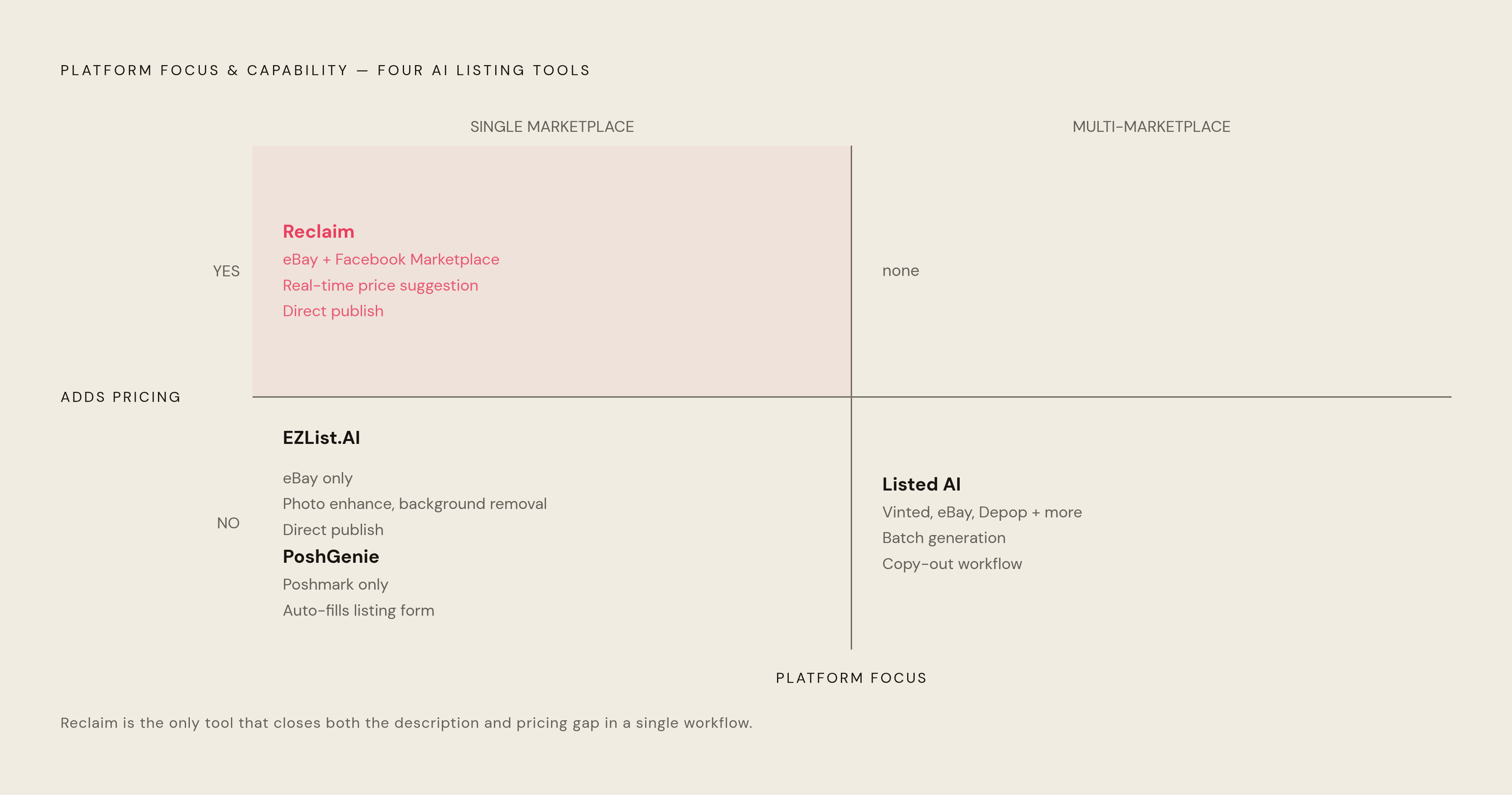
Why pricing from sold data, not asking prices, is the other half of a complete listing
Even with the description done, the seller can still be staring at an empty price field. Guessing a number just moves the same problem one box down the page. Just as photo-first AI gives the description a starting point, real sold data gives the price an evidence base. Some tools combine those steps, so the seller reviews a proposed listing and price. The number still needs a sound basis.
An asking price says what another seller wants, while a sold price records what a buyer actually paid. Copying active listings can therefore reproduce other sellers’ optimism without revealing whether their items will sell. That is why using asking prices can leave an item meant for a quick sale sitting for weeks. A page full of hopeful sellers is not a queue of willing buyers.
Ownership adds another source of distortion. Kahneman, Knetsch, and Thaler’s research describes the endowment effect, in which owners demand roughly twice what non-owners will pay for the same object. The familiar item feels more valuable to the person who owns it. Sadly, the item’s history does not give the buyer more money to spend. Sold data provides an outside reference when affection starts doing the arithmetic.
To find that reference on eBay, search for the item and switch from the default active view to sold or completed listings. Within completed results, use the sales that actually closed. Look for a cluster of recent sales. For a longer lookback, eBay’s Product Research tool, formerly Terapeak, offers up to three years of data. It is free in Seller Hub for sellers who have had at least one sale.
Facebook Marketplace does not show sold prices. The practical workaround is to search the same item in eBay’s completed listings and use actual sales as the starting point. For a Marketplace listing, price slightly above the real minimum to leave room for the negotiation buyers expect. That separates the evidence for the item’s value from the room allowed for bargaining.
Choosing the right marketplace before the listing goes live
Once the description and price are ready, the platform choice comes down to reach. Does the item need a national buyer pool, or will a local one do? Facebook Marketplace is the first choice for bulky items, local pickup and sales where avoiding platform fees is a priority. Local pickup there is free. A large item that needs collecting has a different selling problem from a small collectible that needs the right enthusiast.
For shippable niche items, collectibles and electronics, eBay is the stronger first choice when a national or international audience is needed to find the buyer willing to pay the most. Reach is only part of the calculation, however. eBay charges a higher percentage fee plus a per-transaction charge, while Facebook Marketplace shipped sales cost 10% of the total buyer payment, including item price, shipping and tax, with a $0.80 minimum. The headline sale price is not the take-home amount.
For most casual sellers, a practical approach is to list locally on Marketplace first for speed and zero fees, while keeping the same item on eBay for wider reach. When it sells, delist it from the other platform. Selling locally has its own snags, because Marketplace buyers are often just browsing rather than looking to buy, and many make lowball offers, fail to follow through or never turn up. Leaving room to haggle helps with offers, though it cannot make someone turn up. “Is this available?” is not quite a collection appointment.
A separate app is not always necessary. eBay’s built-in AI listing tools can remove the need for another service when a seller already uses eBay and only wants an eBay listing. A separate photo-first tool becomes more relevant when its batch workflow, platform coverage, form filling or combined pricing solves an additional problem.
Keeping the listing safe — what to strip from photos and what payment methods to refuse
Moving quickly from a photo to a published listing leaves less time to spot personal information in the shot, so remove any mail, prescription labels and family photographs that can be seen before uploading. For phones, tablets and laptops, follow the manufacturer’s instructions to remove accounts and personal data before giving the device to the buyer.
Payment deserves the same deliberate check. Refuse gift card payments, and reject overpayment offers that ask for money to be transferred to a “shipping company”, which are fake-check schemes. A Zelle or Venmo “payment sent” screenshot is not proof, so verify funds in the actual account before releasing the item. Use the payment methods the platform offers and stay away from checks and wire transfers. A notification is not a balance.
Another warning sign is an offer to pay the full price right away that comes with a request to move to text, email or WhatsApp. Keep communication inside the platform until the deal is done, and arrange local pickup in a public place without giving out a home address. These checks belong before upload and handover, when they can still protect the seller.