What Casual Sellers Who Post Fast Actually Have on Their Phones
Fast sellers win by cutting decisions, not by hustling harder.

A snap-a-photo AI listing app can identify an item, suggest a price from sold data, and write a listing for the seller to review before posting. That is the core of a fast casual seller’s phone toolkit, supported by specialist lookup tools and a price-drop reminder. The advantage is not extra motivation but fewer decisions between “sell this” and a live listing.
Why fast sellers aren't more motivated — they've just removed the steps that stall everyone else
The pile of things waiting to be sold is also a pile of unanswered questions. What is this worth, where should it go, and what should the listing say? None sounds especially hard on its own. Together, they turn clearing a cupboard into research that no one pays for. Posting is the easy part once those decisions are out of the way.
Sold-price research replaces guessing, a photo-based app handles the draft, and a simple platform rule settles where to post. Specialist tools help when a category needs more detail. Each piece removes a particular snag in the process. The first snag is usually the price, because getting that wrong can waste both the time spent preparing a listing and the weeks spent waiting afterward.
The pricing mistake that stalls most casual sellers before they even start
An asking price is what a seller wants. A sold price is what a buyer paid. That distinction is easy to miss when a search opens on active listings, all looking reassuringly official. In electronics and furniture, asking prices can diverge substantially from completed sales. Copying an active listing can leave a seller with someone else’s wishful thinking in place of a price that could bring a sale.
Ownership adds its own distortion, called the endowment effect. Kahneman, Knetsch, and Thaler described it in the Journal of Economic Perspectives, including the classic coffee-mug experiment in which owners wanted significantly more to surrender a mug than non-owners would pay to acquire it. Owners can demand roughly twice what non-owners will pay for an identical object. The mug did not get better when someone took ownership of it. Pricing from memory or gut feeling lets that bias set the number, while external sold data gives it something firmer to answer to.
For a casual seller, the practical consequence is delay. An optimistic price can leave an item sitting until it needs relisting, sometimes for less than a realistic first price would have fetched. The price to aim for comes from sales of similar items, with changes to allow for the item being sold.
How to pull sold comps manually — the free research step fast sellers have made automatic
To use that distinction, start by searching eBay for the exact item or a close match. Then filter to sold listings rather than staying in the default active-listing view. Completed listings need care because an ended listing is not necessarily a sale. eBay’s pricing guidance recommends checking what identical or comparable items actually sold for. Once the filter is familiar, finding that data can take under two minutes.
Next, scan the last five to ten sold prices and look for the cluster in the middle. One unusually high sale or one distressed low sale is too little to show what items sell for. Then adjust for condition. Like-new items with boxes or tags sit at the higher end, lightly used items in the middle, and visible wear or missing accessories lower down. Most ordinary used items sell for much less than they cost new at retail.
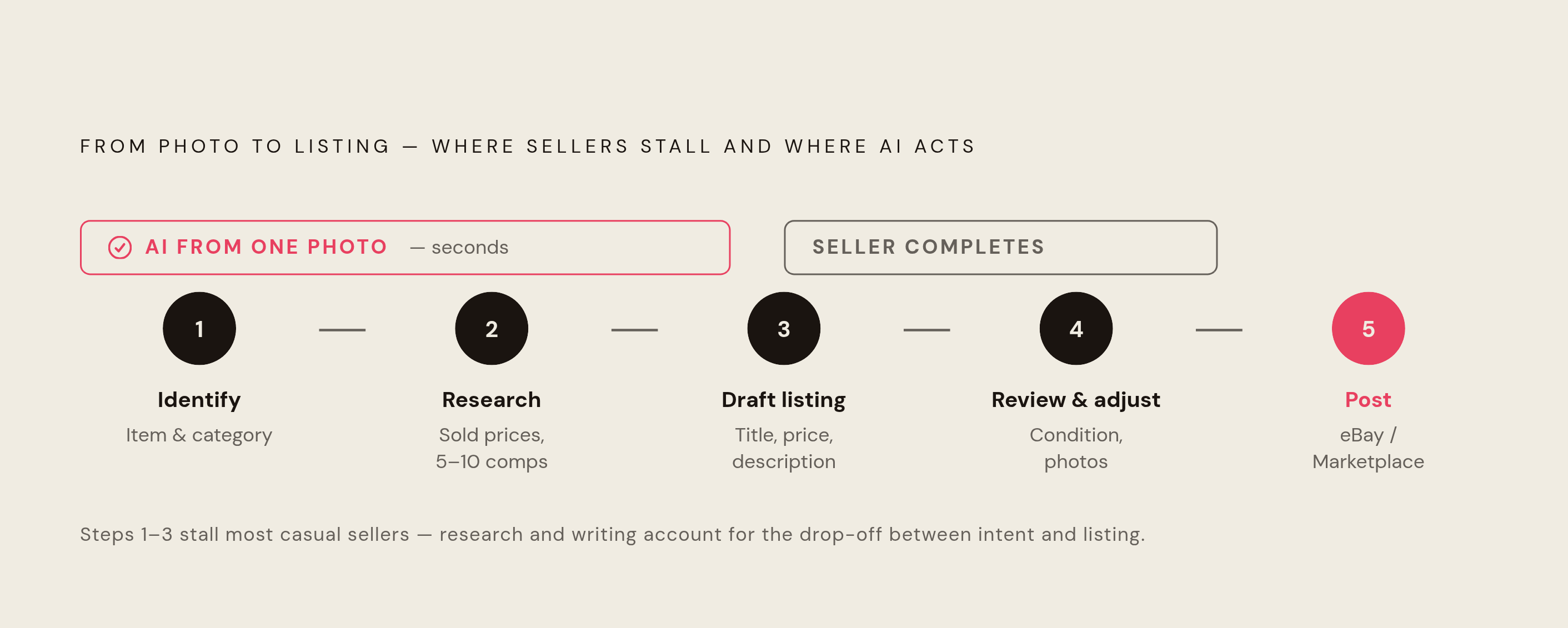
For thin or seasonal categories, eBay’s Product Research tool, formerly Terapeak, offers up to three years of sales history free with Seller Hub access, with desktop access requiring at least one past sale and mobile access requiring an active listing or recent sale. Marketplace does not show the prices of past sales of similar items in the same way, so eBay’s sold data can be a starting point there too. Adding roughly 10 to 15 percent above the walk-away number leaves room for buyers using Make an Offer without abandoning the underlying evidence. The full comparison and adjustment process can take five to ten minutes, which is the work photo-based tools compress to seconds.
Is there an app where a photo creates the listing?
For items without barcodes, a general-purpose photo app can combine identification, condition grading, sold-price research, and listing copy. The useful distinction is the source of its price. Reclaim: Sell with AI is one option that identifies and grades an item from a photo, suggests a price from real-time eBay sold data rather than asking prices, and writes the listing. It lets the seller review or adjust the result before publishing to eBay and Facebook Marketplace, without re-entering the same item details in separate apps. Shipping and payouts remain with the respective marketplace, so the listing tool handles preparation and posting.
Category-specific tools for niches where general apps don't go deep enough
For video games, trading cards, and comics, PriceCharting shows how prices have changed in each category and has tools to keep track of a collection. Its basic features are free. A free account takes away the ads and comes with those tracking tools, while paying for the Collector tier adds deal alerts, an eBay Deal Scanner, and grading recommendations. That makes it a useful companion when these categories form a significant share of what someone sells. It is less compelling as another app to maintain for an unrelated cupboard clear-out.
For books, BookScouter replaces repeated searches with an ISBN barcode scan that compares buyback offers from dozens of vendors. The app is free for sellers to use. It makes its money from vendors who compete to buy books, with no subscription for sellers to pay. This is a different shortcut from creating a public listing, because the scan surfaces vendor offers directly. For a shelf of books, that distinction can remove much of the research work.
For used phones and laptops, Swappa offers a specialist marketplace where sellers deal directly with the next owner. Listing is free, while a sale incurs a percentage-based seller fee and a separate payment-processing fee. Device verification is part of the process. Its IMEI requirement helps establish that a phone is not blacklisted or reported stolen, addressing a particular concern in used-tech transactions.
For antiques and provenance-sensitive collectibles, a specialist valuation service is the option in this toolkit. It requires a subscription. The cost is justified when antiques or vintage collectibles are a consistent part of the seller’s inventory. For people who sell now and then, one or two tools that fit what they sell alongside a general AI listing app are usually enough, without turning the phone into a small auction house.
Choosing the right platform before posting — the decision fast sellers make in seconds
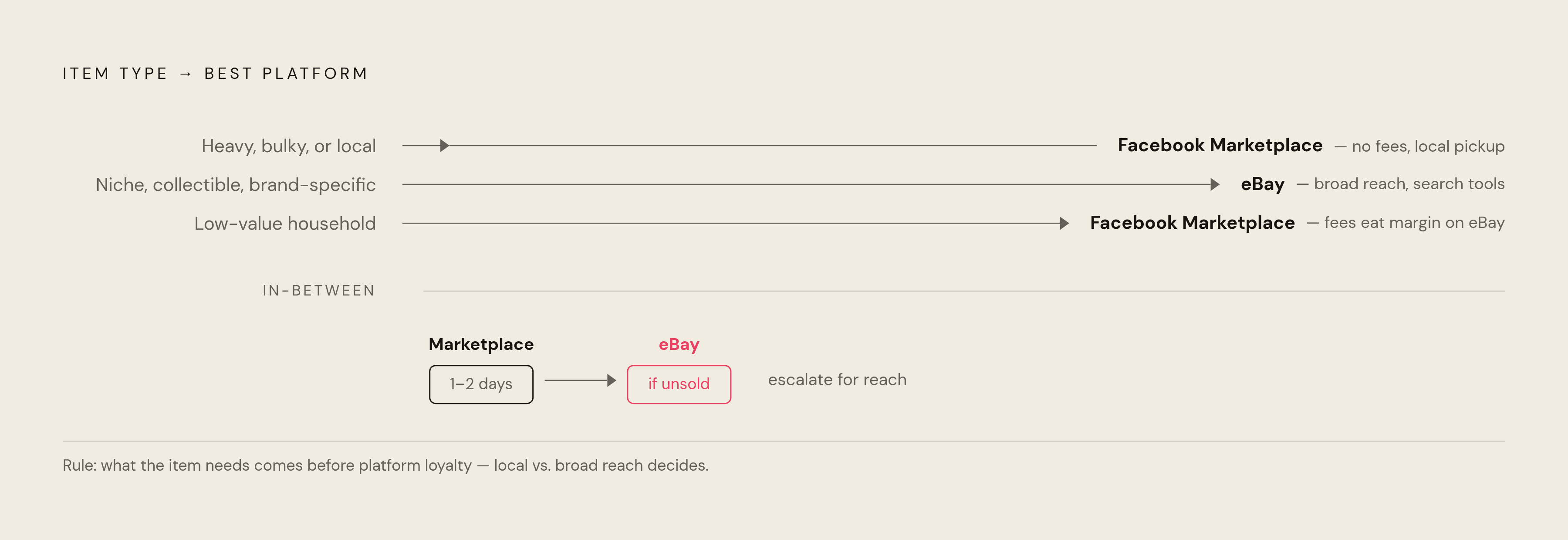
For heavy, bulky, or awkward-to-ship items, Marketplace is the straightforward local option. Local sales have no fees and nothing needs to be shipped. Furniture is the obvious example, because boxing and moving it can overwhelm the economics of the sale. What the object needs comes before loyalty to a brand when choosing where to sell. A dresser does not need a global audience nearly as much as it needs someone who can collect it.
For niche items, collectibles, or items from a specific brand, eBay reaches more buyers and has search tools that help them find a particular thing. For low-value household items, Marketplace often makes more sense because shipping and eBay fees can consume the margin. eBay charges a percentage-based fee plus a small per-transaction amount, while Marketplace shipped orders also incur a fee. “Marketplace is free” is therefore a rule specifically about local sales.
For items between those categories, starting on Marketplace for a day or two gives the no-fee local route a chance before moving to eBay. That sequence favors the lowest-cost channel first. Cross-posting offers a different approach when both audiences are useful. Experienced sellers can keep the same item on Marketplace for a local sale and eBay for broader reach, then remove the other listing when it sells.
What fast sellers actually photograph and write — and why most listings convert without much copy
Once the destination is settled, a listing needs to answer three buyer questions, namely whether the item works, what condition it is in, and what is missing. None requires a sales monologue to answer clearly. A photographed and disclosed scratch lets buyers accept the tradeoff before making contact. The same scratch discovered after a drive across town can trigger renegotiation or a canceled deal.
For Marketplace, casual smartphone photos in natural light should show the item in its current location. For eBay, clear, well-lit photos on a neutral background should cover every angle and document imperfections. Good light does some of the explaining. Buyers can judge a dresser’s condition more easily when it is shown clearly against a tidy background than when it is lost in a dim, cluttered garage. That clarity can support the price and leave fewer reasons to haggle.
For sellers using a photo-based listing tool, the description is already drafted, so they just need to check it and fix any mistakes before posting. For manual listings, the title should include search terms for brand, model, condition, and the key variant, such as size, color, or edition. The description then needs a sentence on condition, one on what is included, and one on flaws, while also making clear whether the item works.
Price history, emotional backstory, and the reason for selling can stay out. Buyers are assessing the item in front of them.
Markdown schedules and the deadline habit that keep the pile from growing back
A live listing can still become another unfinished task if nobody revisits its price. Each extra day puts it in competition with newer listings, while a modest reduction can renew visibility and signal a change to repeat browsers. Follow-up needs a place in the toolkit too. A recurring calendar reminder or a note with a drop date gives the markdown a trigger. Adding a hard deadline keeps “listed” from becoming a permanent storage category.
Setting that schedule when the item goes live avoids inventing a fresh plan each time it fails to sell. The calendar can remember the decision for the seller. Seasonal timing can also help a starting price hold longer before a reduction is needed. Lawn equipment, camping gear, and patio items fit late February or early March, just before spring demand peaks, while winter gear belongs at the tail end of winter. Back-to-school items fit late July and August.
That final reminder belongs beside the camera app and the pricing tools because posting is not the finish line. The item still needs to leave the house. A workflow that handles research and writing but forgets follow-up only gives the pile a digital twin. Fast casual sellers have made even the last decision automatic enough to happen.